
 Ares Tube formerly iTube, lets u browse videos from sites like You Tube, Metacafe, Google videos and a lot of other sites and convert them avi, mpeg or iPod movie format. Check it out and start watching You Tube videos on your iPod....
Ares Tube | A cool tool for the iPod
Ares Tube formerly iTube, lets u browse videos from sites like You Tube, Metacafe, Google videos and a lot of other sites and convert them avi, mpeg or iPod movie format. Check it out and start watching You Tube videos on your iPod....
Back n here again - with some iPod games =D

Hey guys n girls... its been a long time.. guess im back after the long hiatus to bore u with something or the other.. well its a bad time to come back cause i have my exams next week.. anyway will try to post as often as possible...
well a few games for the iPod have been out while i was a way... thought i'd share it with u guys...
the links are below.. feel free to downlaod...


The Sims Bowling
The sims Pool
 Musika
speaking of iPods the new iPod touch is so cool n sexy... its just another iPhone without the phone... with all that multi touch, safari web browser, wi-Fi n all... no email client though but has you tube... its coool
Guess thats enough for a come back... cya guys later...
Rockbox - Now Suppurts 5.5G (80Gb) iPods
 Yaay.... Rockbox for 80Gb iPods at last....
Rockbox is an open source firmware replacement for a growing number of MP3 players. For iPods it offers a large number of plugins, including games (doom is also available for Rockbox n also using Rockboy u can play gameboy n gameboy color ROMs), applications, and "demos" n also u can easily customize themes n stuff.
Installing Rockbox to video ipod is easy. All you have to do is download this file n extract the contents to the root (the main folder of ur iPods drive) of ur iPod. Then run this file while ur iPod still connected.
A comand prompt box will appear, press i followed by ENTER, and ipodpatcher will now install the bootloader. After a short time you should see the message “[INFO] Bootloader installed successfully.” Press ENTER again to exit ipodpatcher. Now u can Disconnect to see Rockbox running in you pod.
To return to apple firmware press play button for 2 secs to turn off Rockbox, then turn on the “hold” switch immediately after turning the player on.. u will be switched back to original iPod firmware n now u can turn off hold. To return back to Rockbox restart (by pressing "Menu" n the centre button at the same time) iPod. Heres the Manual for Complete use n explanation of the plugins.
For other iPod versions n mp3 players please refer to the Site
LOST for your iPod

You guys have already finished watching the season 3 finale of lost n now u dont have anymore lost for a long while.. So what get your ipod n join your favorite castaways in their quest to seek the truth and survive in the official iPod game of our number one television series "Lost". Help Jack search for dynamite, tend to the wounded, and avoid the black smoke. Relive the crash scene, open the hatch, and ultimately try your best to escape from the Others. Immerse yourself into their mysterious world with authentic settings and a genuine storyline created by the writers behind the hit show.
The game "Lost" is only compatible with the 5G & 5.5G iPod running iPod Software 1.2 or later and can be purchased from the iTunes Store for $4.99.
Or ;) ;) ;) ... Yup u guessed it
Click here or here to download it for free.
For those of u guys who doesnt already know how to install the game to your iPod please refer to my previous Tutorial.
All 13 iPod Games Fully Cracked
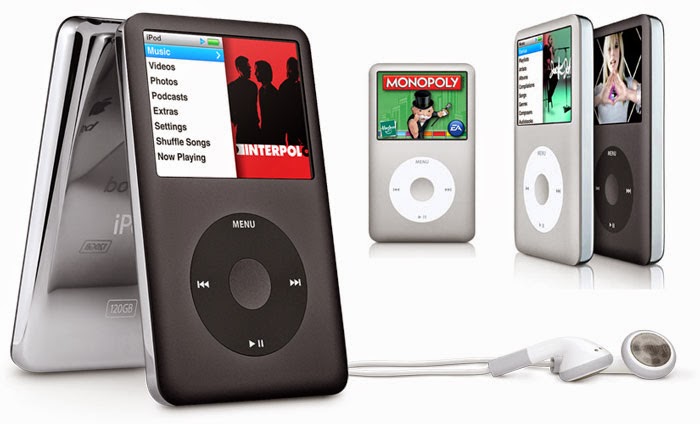 Bored of playing the old same games from your ipod??
Don't Wanna Spend any dough to buy some?
Well don't worry now you can get them for free.
All thanks to the following people:
BadBlox, SoxFan33, iPod Gamez, WillKill07, UgLy-NeRd, Kingstone, Alex13, Redflame124, TechWiz, Midaks, iPodWizard.net, iPodHacks.com
Enough with the talk lets get to business....
1.First you need to enable show hidden files and system files.
To do this open My Computer and click tools from the Menu bar then click Folder Options.
Select the View Tab
Under the Hidden files and folders heading select Show hidden files and folders.
Uncheck the Hide protected operating system files (recommended) option.
Click Yes to confirm.
Click OK.
2. Now Open You iPod from My computer and open the Hidden folder named iPod_Control. Create a new folder and rename it to Games_RO.
Download the games you want from HERE and extract them to this folder. Or Download from Bejeweled, Cubis2, iQuiz, Mahjong, MiniGolf, MsPacMan, PacMan, Solitaire, Sodoku, Hold Em', Tetris, Zuma, Vortex
3.Next you need to transfer your firmware to the hacked one you need to download the correct firmware.for 5G iPods (30Gb and 60Gb Video iPods) use THIS
for 5.5G iPods (80Gb Video iPods) use THIS one
4.Now for the transfer
a- Download iPodWizard
b - Install it and run
c - Click on "Edit Mode" and select "Firmware File" in the scroll menu
d - Click on "Open Firmware" button and navigate to the Firmware******Patched.bin (the one you downloaded in step 3) and click open
e - finally click in "Write to ipod" and let the program write to your ipod the new cracked firmware.
f - close iPodWizard and safely remove your iPod.
g - Reset (Now you might see 3 options available on your iPod, select Apple Os) and start playing !!!!